Skip to Content

AutoCount POS Troubleshooting


The server was not found or was not accessible

Question: 

Failed to login, massage: "Critical Sql Exception... The server was not found or was not accessible...."

Possible Reason:

The SQL service has not been started.

Solution:

Start the SQL service and you will be able to login into AutoCount system.

Step 1: Press the Windows button and type Services.msc or go to Control Panel > Administrative Tools > Services

Solution


QR Ordering Issue


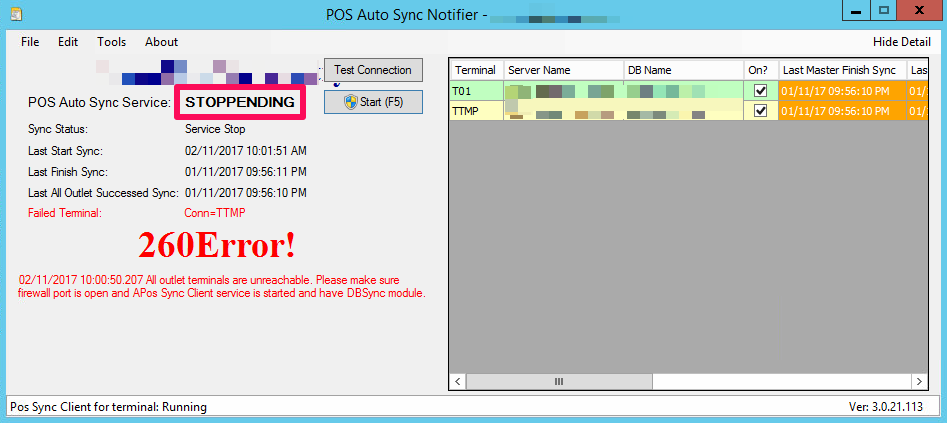
POS Auto Sync Service can’t be stopped - Stoppending

I want to stop my POS Auto Sync, but the status stuck at “STOPPENDING” for a very long time, how to force to stop it by another way?

https://wiki.autocountsoft.com/wiki/Pos:POS_Auto_Sync_Service_can%E2%80%99t_be_stopped_-_Stoppending


AutoCount POS Troubleshooting

License

  1. Activate License – Cannot create a file when that file already exists -(SW/LS/P)

  2. No data available in License Portal -(LS/P)

  3. Why the account book license is Trial Version with 500 transaction limit -(SW/LS/P)
  4. Activation License – Fail to get Server ID from this PC -(SW/LS/P)
  5. Why License Control Panel shows Reload Level status? -(Rot/LS/P)
  6. Unable to register account book license – Same account book can only maintain 1 temporary product ID -(Chr/LS/P)
  7. Error Server ID not match with server ID registered at the USB Key when try to activate license -(Rot/LS/P)
  8. Get Online for License – The remote certificate is invalid according to the validation procedure -(JL/LS/P)
  9. License did not update after click Get Online -(JL/LS/P)
  10. Get Online for License – A connection attempt failed because the connected party did not properly respond after a period time. -(Chr/LS/P)
  11. Server is online but detected as offline license -(SW/LS/P)
  12. Unable to startup AutoCount Server - System.Security.Cryptography.CryptographicException: Padding is invalid and cannot be removed -(CT/LS/P)
  13. License Control Panel shows Stale State status -(Jod/LS/P)
  14. Activate License - This product ID is used by other device -(TN/LS/P)
  15. Activate License - Same device can only maintain 1 temporary product ID -(TN/LS/P)
  16. Temporary product ID is not allowed to deactivate -(TN/LS/P)
  17. Unable to register license or get online license error-Authentication failed because the remote party has closed the transport stream -(CT/LS/P)
  18. Update USB (dongle) Key License error-The remote name could not be resolved : ‘autocountlicense.azurewebsites.net’ -(Ben/LS/P)
  19. Update USB (dongle) Key License error-Authentication failed because the remote party has closed the transport stream -(Ben/LS/P)
  20. License Activation Error - The message received was unexpected or badly formatted -(LS)
  21. AutoCount Server Request Verification Code Error - Object reference not set to an instance of an object -(SW/LS)


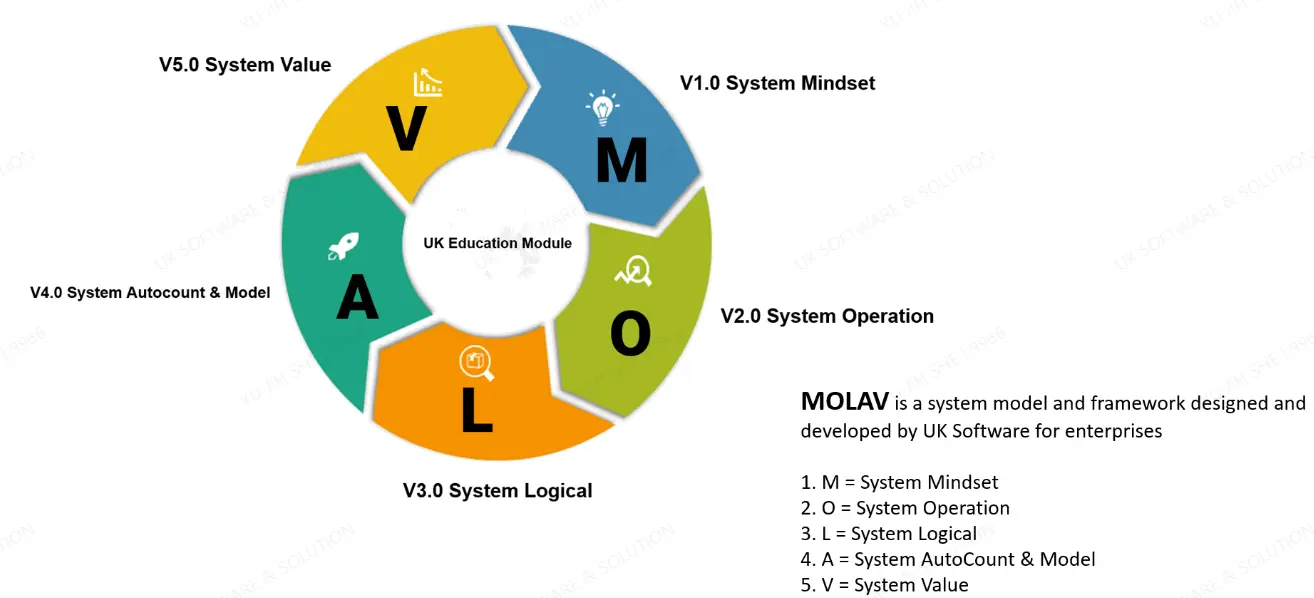
Let’s use MOLAV to help your business grow.


Plan Now

System Core Value

As a leading provider of business management solutions

AutoCount's core value lies in building a seamlessly integrated platform connecting online and offline operations, featuring diversified modules, flexible plug-in extensibility, and robust customization capabilities. 

This enables it to create highly effective and tailored system management solutions for various businesses, ranging from retail to manufacturing and beyond.


On Premise Product
Cloud Based Product

Customization and Scalability of AutoCount Accounting

  AutoCount Accounting offers a high degree of customization and scalability, making it an ideal solution for businesses of all sizes. Whether you're a small startup or a large enterprise, the software can be precisely tailored to meet your unique operational and financial requirements. 

Businesses can begin with essential features and progressively integrate more advanced modules as they expand, ensuring they always have access to the right tools for effective financial management. 

This flexible approach allows organizations to adapt seamlessly to growth and changing business dynamics.

Customization Options

AutoCount Accounting provides a wide range of customization features, allowing businesses to tailor the system according to their specific operational needs. For example, users can modify report formats, add custom fields, and design personalized workflows that align with their internal processes. 

These flexible customization options enable businesses to optimize efficiency and maintain better control over their operations. 

To fully leverage these capabilities, businesses are encouraged to explore AutoCount Customization, which offers deeper insights into how the software can be adapted to support unique business models and requirements. .


Adding New Modules

As your business expands, AutoCount Accounting can be seamlessly enhanced by integrating additional modules and advanced functionalities. For instance, businesses can implement modules such as Payroll, Advanced Inventory Management, or Project Accounting to support growing operational demands. 

With over 50 modules available, each offering specialized features, AutoCount ensures that businesses can continuously adapt and scale their financial and operational systems—effectively meeting evolving requirements while maintaining optimal performance and control.  


Adding New Plugins

AutoCount Accounting also supports over 100 specialized plugins, each designed to extend the software’s capabilities with targeted features and functions. 

These plugins empower businesses to further customize the system to align with their unique operational workflows and industry-specific requirements. By integrating the right plugins, companies can enhance productivity, streamline processes, and support scalable growth—ensuring the software evolves in tandem with their business expansion.

Scaling for Large Businesses

AutoCount Accounting is engineered to efficiently manage high volumes of transactions while supporting multi-user access, making it well-suited for businesses with complex operations. 

Additionally, it is designed with integration capabilities that allow seamless connectivity with other enterprise systems such as POS, CRM, and ERP solutions. This robust scalability ensures that larger businesses can maintain smooth operations, enhance data consistency across departments, and support long-term growth without compromising performance or accuracy.

Product Inquiry

We’d love to hear from you! Whether you have questions, feedback, or require assistance, our dedicated team is ready to help. Simply fill out the form below, and we’ll get back to you within 24 hours. Thank you for reaching out to us — we look forward to connecting with you!  

  uksoftware2u@gmail.com 

  +60127479966 

   HQ : 99 Jalan Kota, Taman Kota, 83700 Yong Peng, Johor