、
How to Build Your System
ERP / Accounting Implementation Lifecycle
A Professional Implementation Framework by UK Education Knowledge Framework
At UK Education Knowledge Framework we believe that every successful accounting system implementation begins with a structured foundation.
Our ERP / Accounting Implementation Lifecycle is designed to ensure a smooth, secure, and systematic transition — from system installation to full user adoption.
This lifecycle framework reflects our decade of implementation experience and deep understanding of AutoCount and enterprise software environments.
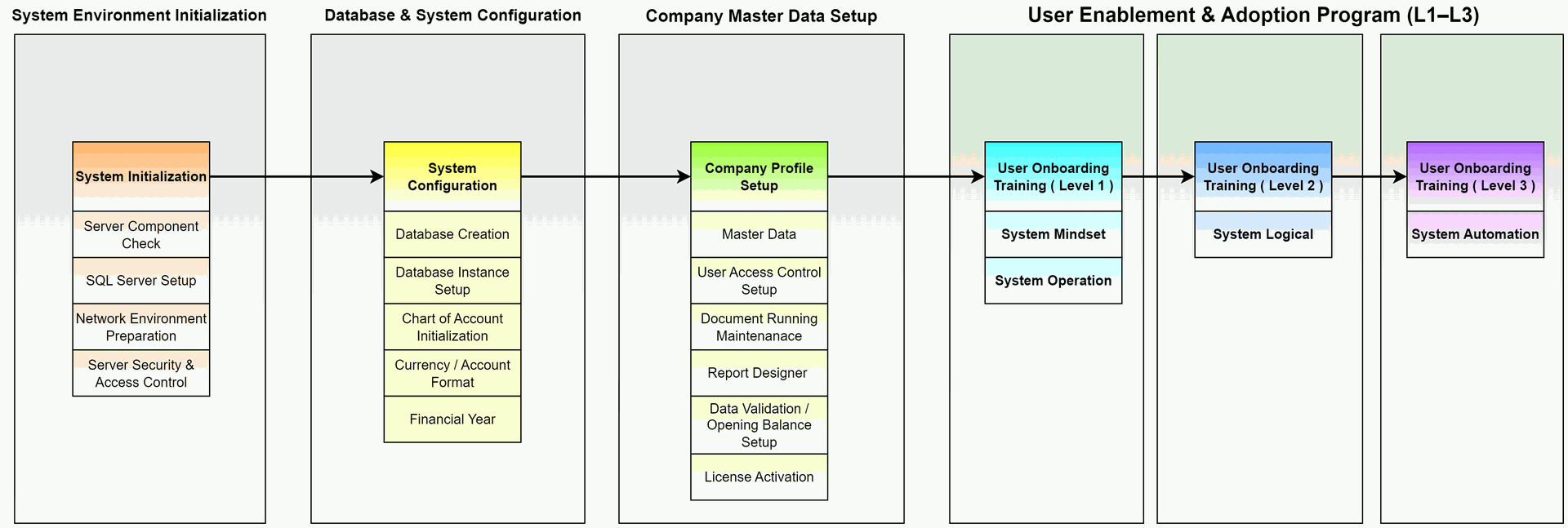
ERP / Accounting Implementation Detail
Phase | Description | Key Processes |
Phase 1 | System Environment Initialization | Build a secure and stable environment for your ERP system.
|
Phase 2 | Database & System Configuration | Configure database structure and accounting framework.
|
Phase 3 | Company Master Data Setup Define your company profile, control policies, and master data. |
AutoCount Accounting Shortcut Keys Summary AutoCount Accounting Import from Excel Specification AutoCount Accounting Help File 2009 |
User Enablement & Adoption Program
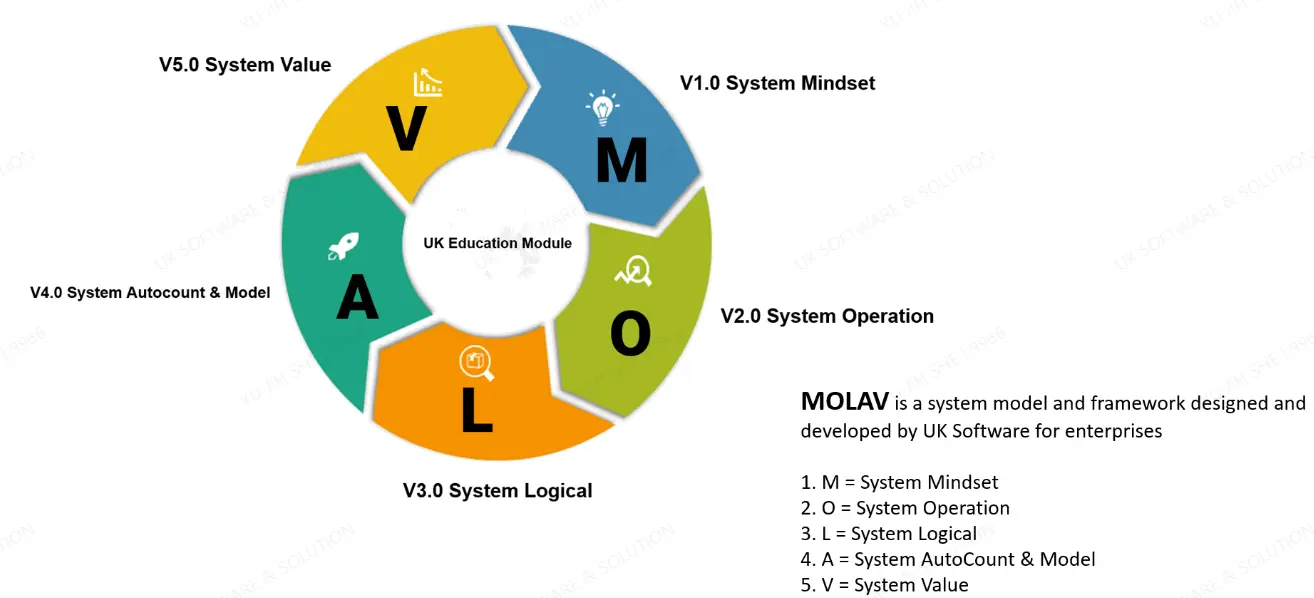
L1 – System Mindset & Operation |
|
L2 – System Logical |
|
L3 – System Automation: |
|
Checklist for Building and Configuring Your System
| Task | Description |
|---|---|
| Business Environment | Understand company workflow, operations, and stakeholders |
| Invoice | Set up invoice templates, numbering, and billing processes |
| SST | Configure sales / service and tax reporting according to SST compliance |
| Access Rights | Define user roles, permissions, and control access to sensitive data |
| Payment Method | Set up accepted payment methods and ensure smooth processing |
AutoCount System Requirement
| Component | Minimum Requirement |
| .Net Framework | Microsoft .Net Framework 4.8 and above |
| Processor | Intel Core i3 / i5 Processors ( Recommended i7 Processors ) |
| Server RAM (Memory) | 4 GB (Recommended 8 / 16GB) |
| Server Storage Space | 2 GB for Application, 10 GB for database and working |
Operation System | Windows 2016 Server / Window 10 / Window 11 (One) Users Or Higher Operation System |
| Database | Microsoft SQL Sever 2014 / 2019 Express or Higher |

System Core Value
As a leading provider of business management solutions
AutoCount's core value lies in building a seamlessly integrated platform connecting online and offline operations, featuring diversified modules, flexible plug-in extensibility, and robust customization capabilities.
This enables it to create highly effective and tailored system management solutions for various businesses, ranging from retail to manufacturing and beyond.


On Premise Product
Cloud Based Product



Customization and Scalability of AutoCount Accounting
AutoCount Accounting offers a high degree of customization and scalability, making it an ideal solution for businesses of all sizes. Whether you're a small startup or a large enterprise, the software can be precisely tailored to meet your unique operational and financial requirements.
Businesses can begin with essential features and progressively integrate more advanced modules as they expand, ensuring they always have access to the right tools for effective financial management.
This flexible approach allows organizations to adapt seamlessly to growth and changing business dynamics.

Customization Options
AutoCount Accounting provides a wide range of customization features, allowing businesses to tailor the system according to their specific operational needs. For example, users can modify report formats, add custom fields, and design personalized workflows that align with their internal processes.
These flexible customization options enable businesses to optimize efficiency and maintain better control over their operations.
To fully leverage these capabilities, businesses are encouraged to explore AutoCount Customization, which offers deeper insights into how the software can be adapted to support unique business models and requirements. .
Adding New Modules
As your business expands, AutoCount Accounting can be seamlessly enhanced by integrating additional modules and advanced functionalities. For instance, businesses can implement modules such as Payroll, Advanced Inventory Management, or Project Accounting to support growing operational demands.
With over 50 modules available, each offering specialized features, AutoCount ensures that businesses can continuously adapt and scale their financial and operational systems—effectively meeting evolving requirements while maintaining optimal performance and control.
Adding New Plugins
AutoCount Accounting also supports over 100 specialized plugins, each designed to extend the software’s capabilities with targeted features and functions.
These plugins empower businesses to further customize the system to align with their unique operational workflows and industry-specific requirements. By integrating the right plugins, companies can enhance productivity, streamline processes, and support scalable growth—ensuring the software evolves in tandem with their business expansion.

Scaling for Large Businesses
AutoCount Accounting is engineered to efficiently manage high volumes of transactions while supporting multi-user access, making it well-suited for businesses with complex operations.
Additionally, it is designed with integration capabilities that allow seamless connectivity with other enterprise systems such as POS, CRM, and ERP solutions. This robust scalability ensures that larger businesses can maintain smooth operations, enhance data consistency across departments, and support long-term growth without compromising performance or accuracy.

Product Inquiry
We’d love to hear from you! Whether you have questions, feedback, or require assistance, our dedicated team is ready to help. Simply fill out the form below, and we’ll get back to you within 24 hours. Thank you for reaching out to us — we look forward to connecting with you!