AutoCount Integration Workflow
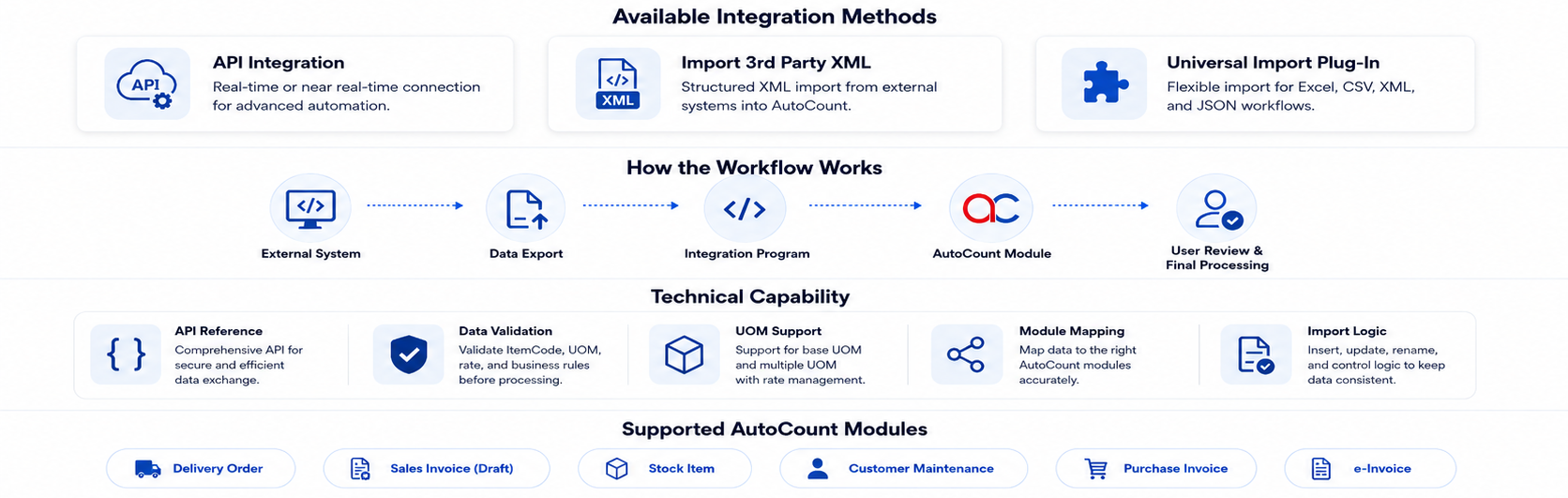
We provide several methods for system integration with AutoCount, based on the customer’s operational needs and technical environment.
Choose the most suitable integration method based on your workflow, data structure, and automation requiments.
Key Benefits
- Reduce manual data entry
- Minimize human error
- Improve data accuracy
- Speed up document processing
- Connect external systems with AutoCount
- Support customized business workflows
- Suitable for API, XML, Excel, and CSV integration
The available integration methods include:
AutoCount On-Premise - API ( Application Programming Interface )
Resources For AutoCount Software Developers
Sample with data model
Create New Sale Invoice
public void NewSaleInvoice(AutoCount.Authentication.UserSession userSession, SaleInvoiceSource source)
{
    string newDocStr = AutoCount.Const.AppConst.NewDocumentNoAutoCount.Const.AppConst.NewDocumentNo;
    AutoCount.Invoicing.Sales.Invoice.InvoiceCommand cmd =
        AutoCount.Invoicing.Sales.Invoice.InvoiceCommand.Create(userSession, userSession.DBSetting);
    AutoCount.Invoicing.Sales.Invoice.Invoice doc = cmd.AddNew();

    doc.DebtorCode = source.CustomerCode;
    //if source.DocumentNo is null, then will use a new running number.
    doc.DocNo = source.DocumentNo ?? newDocStr;
    doc.DocDate = source.DocumentDate;
    doc.Description = source.Description;
    doc.CurrencyRate = source.CurrencyRate;
    doc.Agent = source.SalesPerson;

    //Set to apply rounding method of either by Document or by Each Line,
    //this may affect different result in GST Calculation due to decimal point.
    doc.RoundingMethod = source.RoundMethod;

    //Document Level Inclusive Tax
    doc.InclusiveTax = source.Inclusive;

    source.Details.ForEach(s => AddSaleInvoiceDetail(s, doc.AddDetail));

    try
    {
        doc.Save();
        //log success
        //AutoCount.AppMessage.ShowMessage(string.Format("{0} is created.", doc.DocNo));
    }
    catch (AutoCount.AppException ex)
    {
        //log ex.Message
        //AutoCount.AppMessage.ShowMessage(ex.Message);
    }
}

private void AddSaleInvoiceDetail(SaleInvoiceDetail sourceDtl,
    Func<AutoCount.Invoicing.Sales.Invoice.InvoiceDetail> addToDoc)
{
    AutoCount.Invoicing.Sales.Invoice.InvoiceDetail dtl = addToDoc();

    dtl.AccNo = sourceDtl.Account;
    //When ItemCode is assigned, AccNo will be refreshed based on ItemGroup's SaleAccNo;
    //If ItemGroup is not maintained, then default Sale AccNo will be assigned.
    dtl.ItemCode = sourceDtl.ItemCode;
    dtl.Description = sourceDtl.Description ?? dtl.Description;
    if (sourceDtl.Project != null)
        dtl.ProjNo = sourceDtl.Project;
    if (sourceDtl.Department != null)
        dtl.DeptNo = sourceDtl.Department;
    if (sourceDtl.Location != null)
        dtl.Location = sourceDtl.Location;
    dtl.Qty = sourceDtl.Quantity ?? dtl.Qty;
    dtl.UOM = sourceDtl.Uom ?? dtl.UOM;
    dtl.UnitPrice = sourceDtl.UnitPrice ?? dtl.UnitPrice;
    dtl.Discount = sourceDtl.Discount ?? dtl.Discount;
    dtl.SubTotal = sourceDtl.Amount ?? dtl.SubTotal;
    if (sourceDtl.GSTCode != null)
        dtl.TaxType = sourceDtl.GSTCode;
    dtl.TaxAdjustment = sourceDtl.GSTAdjustment;
}
Classes of source
public class SaleInvoiceSource
{
    public string CustomerCode { get; set; }
    public string DocumentNo { get; set; }
    public DateTime DocumentDate { get; set; }
    public string Description { get; set; }
    public decimal CurrencyRate { get; set; } = 1;
    public string SalesPerson { get; set; }
    public AutoCount.Document.DocumentRoundingMethod RoundMethod { get; set; } =
        AutoCount.Document.DocumentRoundingMethod.LineByLine_Ver2;
    public bool Inclusive { get; set; } = false;
    public List<SaleInvoiceDetail> Details { get; set; } = new List<SaleInvoiceDetail>();
}

public class SaleInvoiceDetail
{
    public string Account { get; set; }
    public string ItemCode { get; set; }
    public string Description { get; set; }
    public string Location { get; set; }
    public string Project { get; set; }
    public string Department { get; set; }
    public decimal? Quantity { get; set; }
    public string Uom { get; set; }
    public decimal? UnitPrice { get; set; }
    public string Discount { get; set; }
    public decimal? Amount { get; set; }
    public string GSTCode { get; set; }
    public decimal GSTAdjustment { get; set; }
}
Implementation
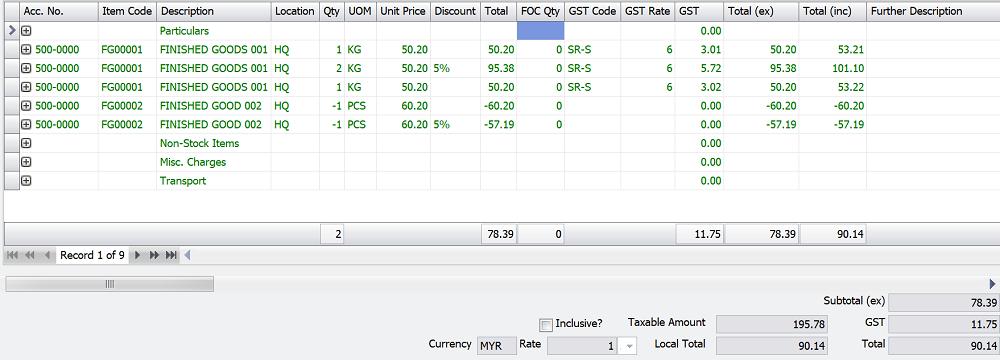
public void MainEntry(AutoCount.Authentication.UserSession userSession)
{
    SaleInvoiceSource newDoc = new SaleInvoiceSource()
    {
        CustomerCode = "300-A001",
        Description = "SALES INVOICE GENERATED",
        //If let AutoCount auto assign running number, assign "<<New>>" is unnecessary
        //DocumentNo = "<<New>>",
        DocumentDate = new DateTime(2017, 11, 30),
        Inclusive = true
    };

    //There are many ways which data input can be entered into details, here are some of the common input.
    newDoc.Details.Add(new SaleInvoiceDetail() { Description = "Particulars" });
    newDoc.Details.Add(new SaleInvoiceDetail() { ItemCode = "FG00001", Quantity = 1, UnitPrice = 50.20M, GSTCode = "SR-S" });
    newDoc.Details.Add(new SaleInvoiceDetail() { ItemCode = "FG00001", Quantity = 2, UnitPrice = 50.20M, Discount = "5%", GSTCode = "SR-S" });
    newDoc.Details.Add(new SaleInvoiceDetail() { ItemCode = "FG00001", Quantity = 1, GSTCode = "SR-S", Amount = 50.20M });
    //Return stock is allowed, if the NetTotal is larger or equal to Zero after deduction.
    newDoc.Details.Add(new SaleInvoiceDetail() { ItemCode = "FG00002", Quantity = -1, GSTCode = "SR-S", Amount = -60.20M });
    newDoc.Details.Add(new SaleInvoiceDetail() { ItemCode = "FG00002", Quantity = -1, UnitPrice = 60.20M, Discount = "5%", GSTCode = "SR-S" });

    newDoc.Details.Add(new SaleInvoiceDetail() { Description = "Non-Stock Items" });
    //When AccNo & ItemCode both are not defined, system will retrieve from default Sale Account.
    //If default Sale Account is not maintained in Tools | Options, system will throw error on saving.
    newDoc.Details.Add(new SaleInvoiceDetail() { Description = "Misc. Charges", GSTCode = "SR-S", Amount = 30 });
    newDoc.Details.Add(new SaleInvoiceDetail() { Account = "500-0000", Description = "Transport", Amount = 50, GSTCode = "SR-S" });

    NewSaleInvoice(userSession, newDoc);
}
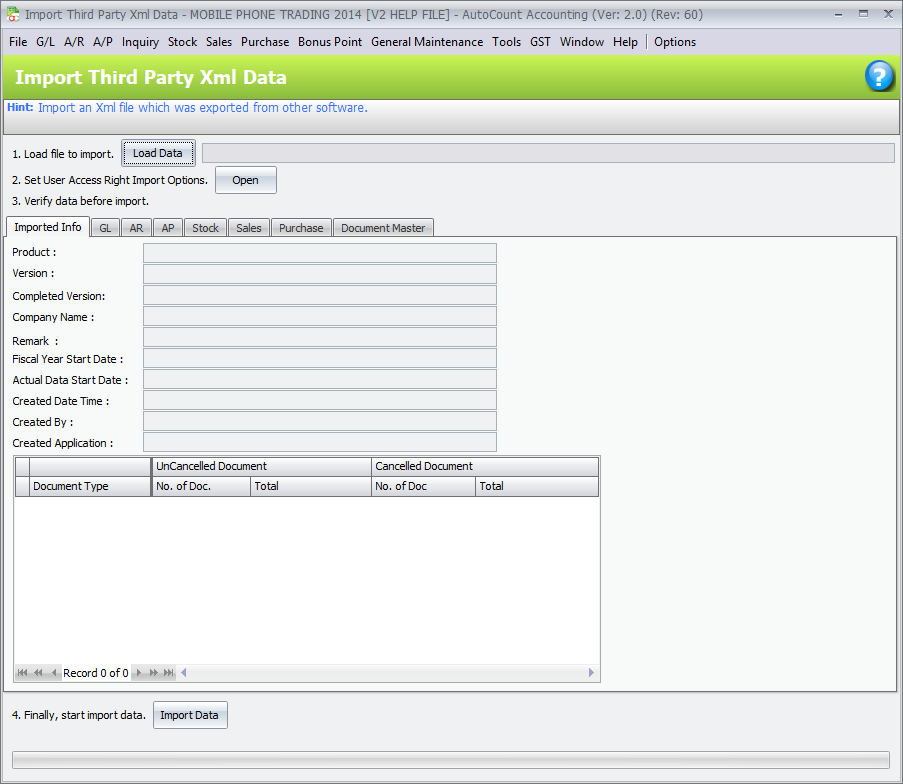
Import 3rd Paty XML
This method is to extract data from your system and write the source to XML Data file. The XML structure must be according to the structure defined by AutoCount Accounting system.

XML Schema specification, guideline and samples can be downloaded.
Download XML Samples & basic XML Schema