Skip to Content

Introduction to AutoCount

AutoCount Accounting is a powerful and reliable accounting software designed to help businesses manage their financial operations efficiently and accurately. 

It simplifies accounting processes, improves financial visibility, and supports businesses in maintaining compliance with financial regulations.


Core Benefits


  • Streamlined Processes - Simplifies daily accounting tasks and improves workflow efficiency.

  • Regulatory Compliance - Helps businesses stay compliant with current financial and statutory requirements.

  • Better Decision Making - Provides clear financial reports and insights for smarter business decisions.

  • Scalable Solution - Suitable for SMEs and growing businesses, with features that support long-term business expansion.

  • Program Customization - Flexible customization options to adapt the system according to your specific business processes and operational needs.


Operation Module

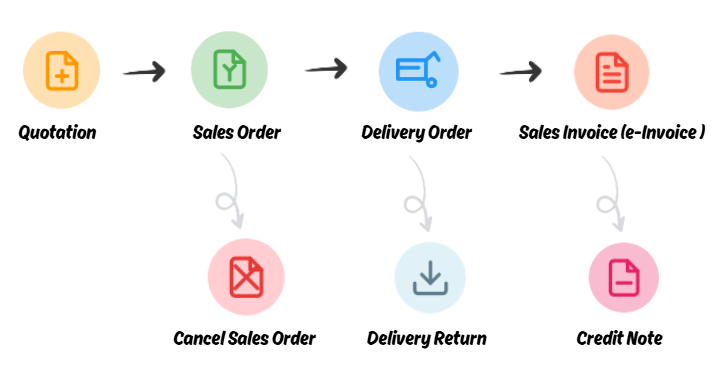
A simple and professional document workflow designed to help businesses manage daily operations more efficiently. 

The system supports Document Transfer and Partial Transfer, enabling seamless document conversion and complete document traceability to improve operational efficiency and management transparency.


Interface Overview

The AutoCount management interface is built with a modern and user-friendly design, providing a clear and efficient environment for managing invoices and financial data while enhancing overall financial management efficiency.


Key Features


  • Complete Document Management - Create, edit, preview, print, and manage document within a single centralized interface.

  • Clear Data Visibility -  Key information such as customer details, invoice amounts, outstanding balances, and transaction records are clearly displayed for quick reference.

  • Smart Search & Sorting - Flexible search and sorting tools allow users to quickly locate the documents they need.

  • Efficient Digital Workflow - Optimized invoicing processes reduce manual errors and improve operational efficiency.

  • Modern Business Management  - Centralized data and structured processes help businesses maintain a more transparent, efficient, and well-organized financial management system.


Document Flow Tracking 

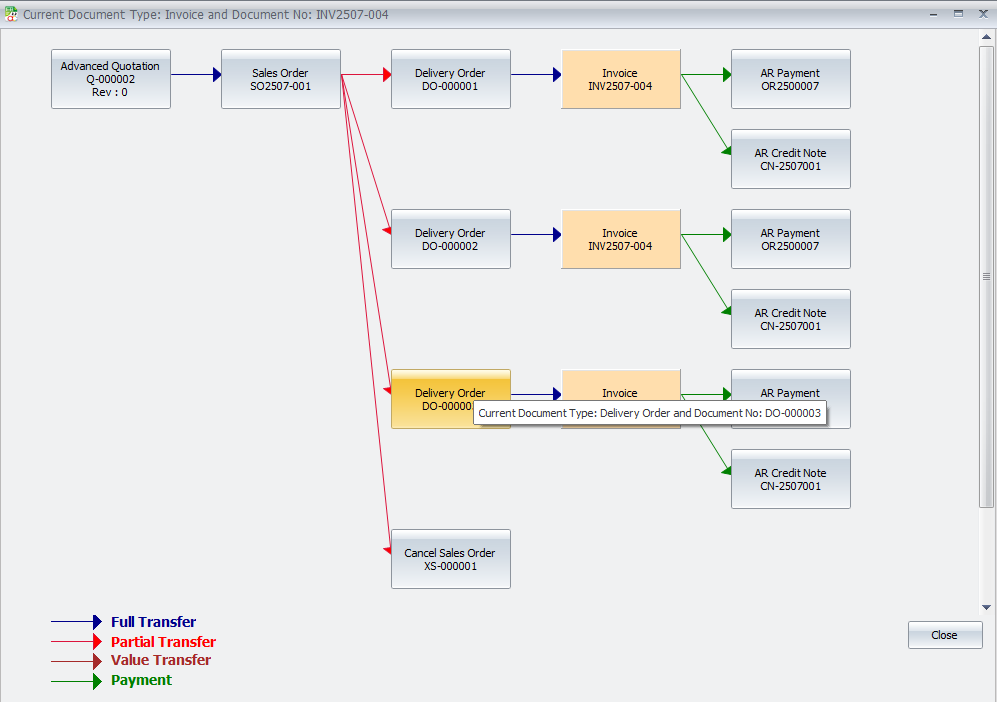
AutoCount Document Flow clearly maps the entire lifecycle of your transactions. By following the connecting arrows, users can instantly trace how documents move from one stage to another, ensuring full visibility and accurate tracking throughout the business process.
Reports

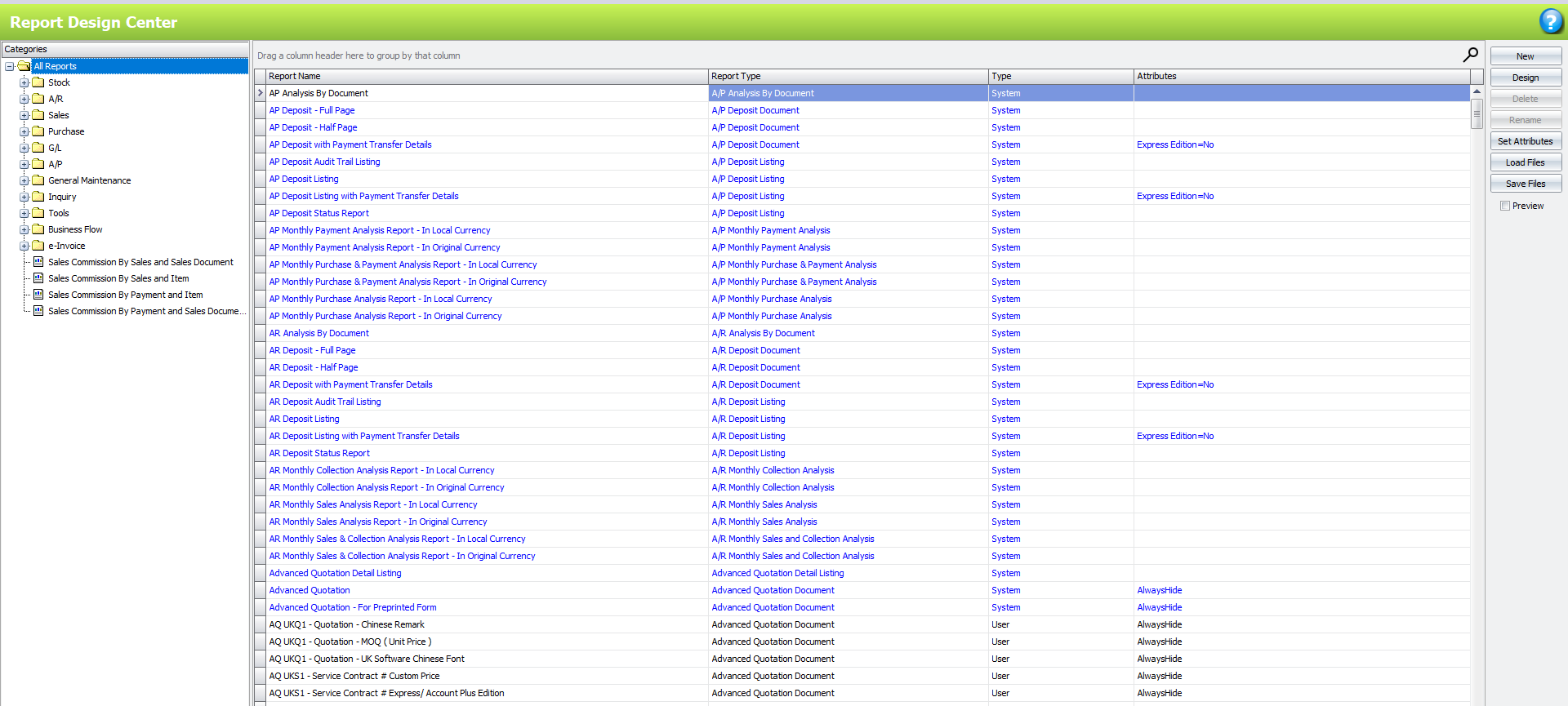
AutoCount provides over 700+ ready-to-use report formats that can be generated and printed instantly. These reports cover not only standard financial statements but also provide deeper insights into business performance.

The system can easily generate AR / AP - Statements, Aging Reports, GL - Profit & Loss, Trial Balance, and Balance Sheet, along with various operational and analytical reports to help businesses better understand their financial position and overall performance.

Customizable reporting is also supported, allowing businesses to tailor report formats and contents based on their specific management and operational needs.
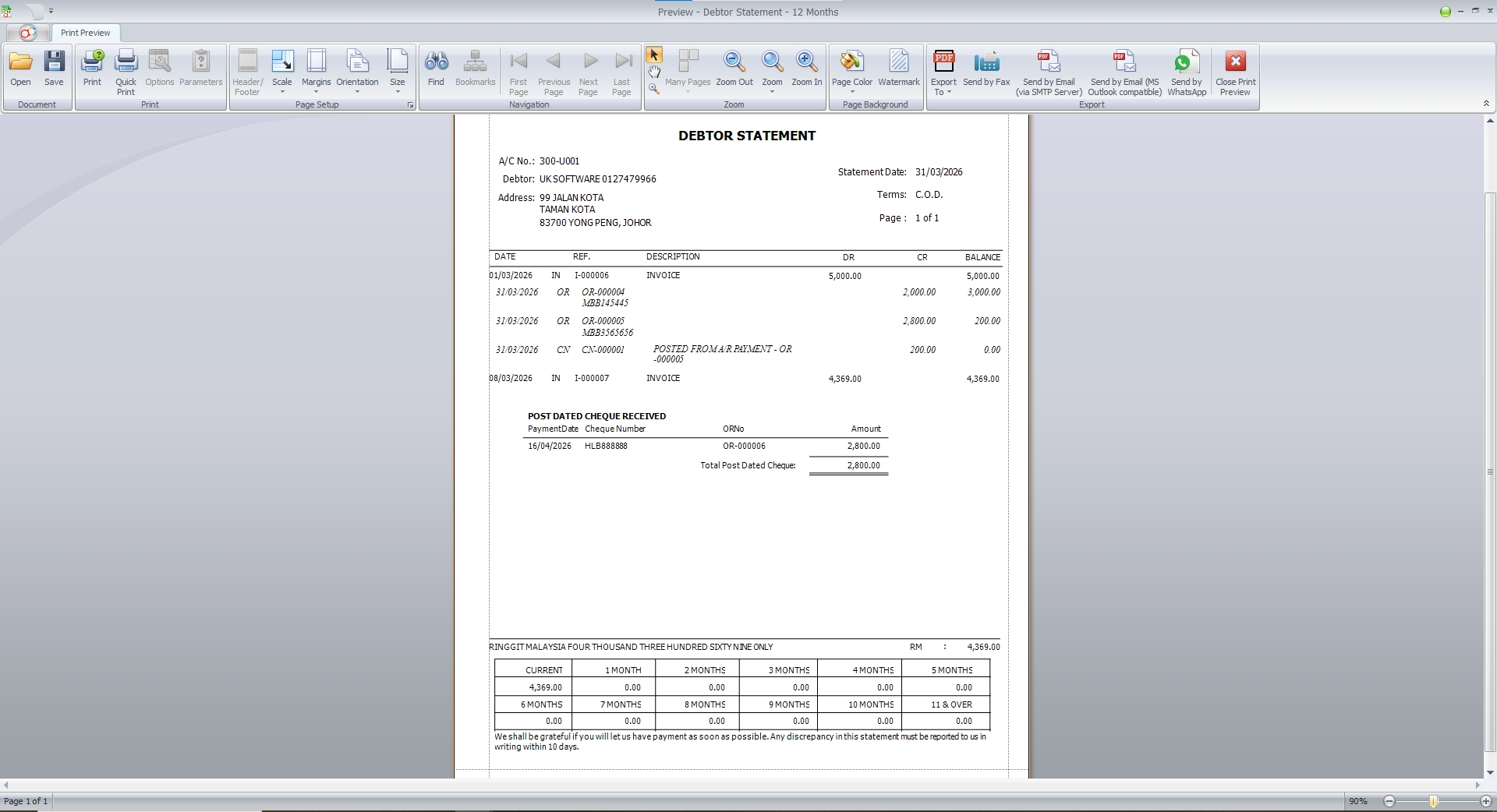
AutoCount Sample Report


Sales BI Dashboard  

The Sales BI Dashboard converts your sales data into clear, real-time visual insights. With interactive charts and flexible drill-down filters, businesses can easily monitor sales performance, identify trends, and make faster, data-driven decisions to support business growth.

UDF / Formula Editor

AutoCount includes a built-in Formula Editor, allowing users to customize system logic without the need for external development. Businesses can define logic-based calculations using UDF (User Defined Fields) to automatically calculate and populate values in invoice columns, improving efficiency and flexibility in document processing.

Access Right Control 

AutoCount Accounting provides a comprehensive Access Rights Control system that enables administrators to define detailed user and group permissions at the module, function, and transaction levels, ensuring secure and well-managed system access.

Manufacturing

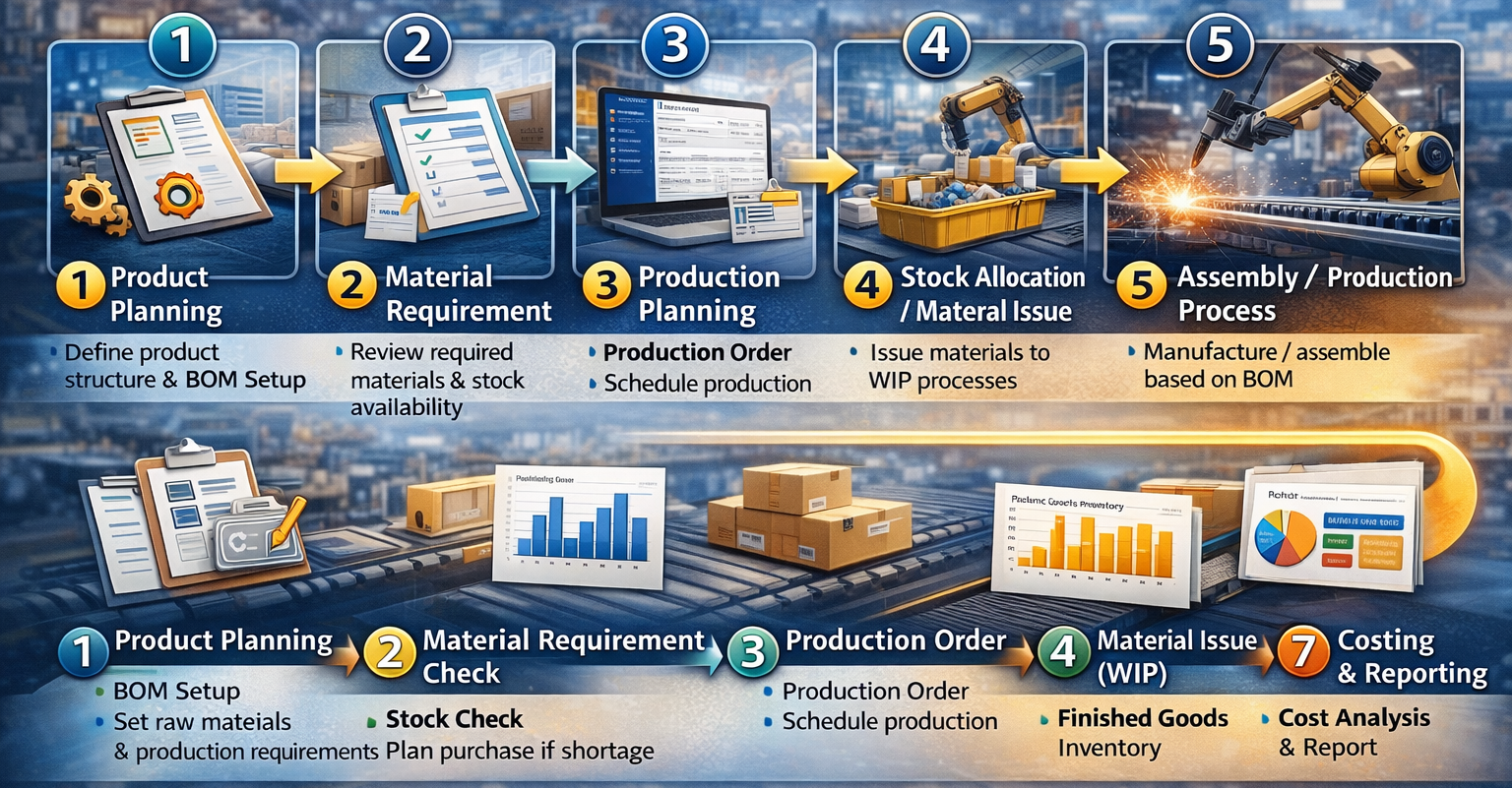
AutoCount Accounting provides comprehensive features to support manufacturing operations, helping businesses manage production costs, materials, and inventory efficiently. The system enables better control over Bill of Materials (BOM), production processes, and costing, ensuring accurate tracking of raw materials, work-in-progress, and finished goods.

With integrated inventory and financial management, manufacturers can improve production planning, control costs, and gain clearer insights into overall operational performance.
Modules, Plug-Ins & API

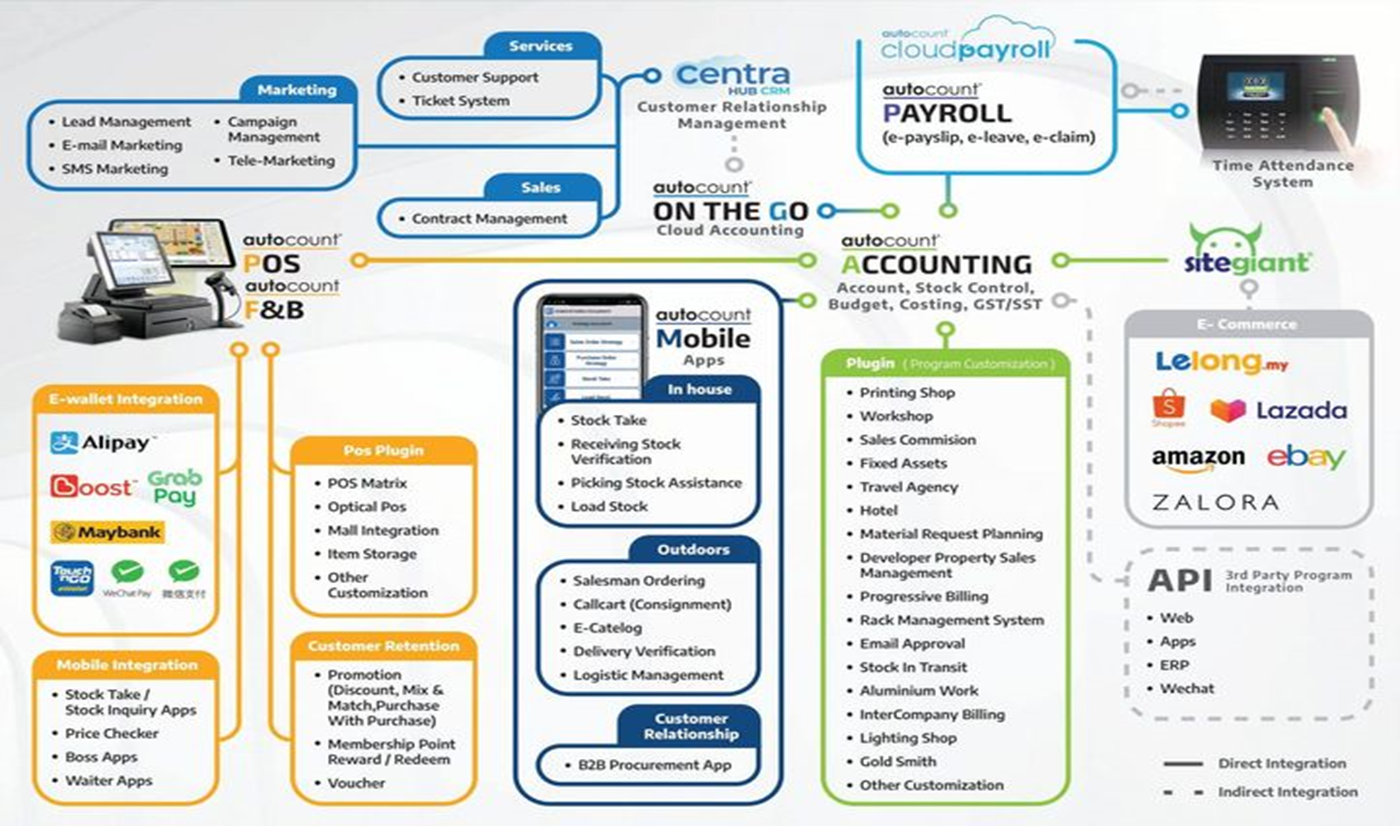
AutoCount adopts a modular architecture, allowing businesses to activate only the features they need while maintaining the flexibility to expand as their operations grow. 

The system includes core modules such as GL, AR, AP, Sales, Purchase, Stock, and Tax.

In addition, it provides advanced modules designed for various industry requirements, including Multi-Location, Project, Budgeting, Advanced Financial Reports, Advanced Multi-Currency, Intelligent Costing, and Consignment, enabling businesses to achieve more comprehensive and efficient financial and operational management.

The system also features powerful Plug-in extensibility and open API integration, allowing seamless connectivity with external applications and third-party systems. This enables greater system flexibility, data integration, and scalable business solutions to support continuous business growth.

Module Function List Product Edition Specification

Malaysia Tax Compliance & e-Invoicing

AutoCount supports global tax compliance and e-Invoicing requirements, while seamlessly integrating with Malaysia’s SST (Sales and Service Tax) and e-Invoice systems. It provides businesses with efficient and reliable tools for tax management and invoicing.

Whether your business operates in trading, services, manufacturing, or project-based industries, the system helps ensure accurate tax reporting and smooth e-Invoice processing. 

By simplifying complex procedures, AutoCount enables businesses to maintain full compliance with regulatory requirements.


Global & Southeast Asia Tax Compliance Support

Singapore (IRAS) -  Fully supports the requirements of the Inland Revenue Authority of Singapore (IRAS), enabling easy generation and submission of GST reports, and seamless integration with the InvoiceNow e-invoicing system.

Philippines (BIR) -  Optimized for the Philippine market, ensuring accounting processes comply with the regulations of the Bureau of Internal Revenue (BIR).

Indonesia & Other Countries - Provides flexible tax configuration that can be adapted to country-specific tax regulations, including Indonesia and other markets, helping businesses maintain compliant and efficient cross-border operations.




Learn AutoCount Accounting in Just 60 minutes

All our user setup video guide materials has been broken down into digestible chunks and you can learn at your own pace. These videos contain everything you need to know to get started with AutoCount Accounting. Enjoy!

eLearning For Accounting 

Build Your Bussiness Flow


Plan Now


Industry Flow Sample 

Increased Efficiency

AutoCount Accounting automates various routine operations and tasks. For instance, invoicing and report generation. As a result, this automation saves time. Moreover, it also reduces the risk of errors. In addition, it allows financial teams to focus on more strategic activities. Consequently increasing efficiency.  


Increased Efficiency

AutoCount Accounting automates various routine operations and tasks. For instance, invoicing and report generation. As a result, this automation saves time. Moreover, it also reduces the risk of errors. In addition, it allows financial teams to focus on more strategic activities. Consequently increasing efficiency.  


Accurate Financial Management

The software ensures that financial records are always accurate and current. Thus minimizing the risk of errors that could lead to compliance issues or financial mismanagement. Consequently, businesses can maintain confidence in their financial integrity. Moreover, they can also increases data accuracy.  


Cost Savings

This accounting software streamline financial operations and processes. In addition, it reduce the need for manual work. Thus, AutoCount Accounting can help the business to saving a substantial amount of cost. Moreover, its modular pricing ensures that businesses only pay for the features they use. Subsequently making it a cost-effective solution. More importantly, those saved cost can be used to boost performance and productivity.


Enhanced Decision Making

AutoCount Accounting provides real-time financial data and customizable reports. Therefore, it offers valuable insights that support better decision-making. In turn, this helps businesses to identify trends more effectively. In addition, they can also forecast future performance more effectively.


Scalability for Growing Businesses

This accounting software is designed to grow and scale with your business. Its modular design allows companies to add new features and capabilities as their needs evolve. Thus, it is a very flexible and adaptable solution that can grow alongside your business. Consequently, any business can use this AutoCount Accounting into their own operations. Ultimately, these businesses that uses it can continue to use this system even if their business has grown drastically.


Customer Support

Round-the-clock assistance is available, ensuring issues are resolved quickly, keeping your operations running smoothly.


AutoCount Accounting Version Specification


In order to use the AutoCount Accounting smoothly and to its fullest and best performance, it is recommended that both the Server and the Workstation PC have hardware and software components that meets the minimum requirements specified below: 


ComponentsServer
(Minimum Requirements)
Workstation PC
(Minimum Requirements)

Operating System

Windows 10, Windows Server 2016 and above

Windows 10 and above

Database Engine / Database Server

Mircrosoft SQL Server 2012 or higher

-

.Net Framework

Microsoft .Net framework 4.8 and above

Microsoft .Net framework 4.8 and above

Processor

Intel Core i5 Processors (Recommended i7 Processors)

Intel Core i3 Processors

RAM (Memory)

4 GB (Recommended 8 GB)

2 GB

Storage Space

1 GB for application, 10 GB for database and working

1 GB for application

Local Area Network

100 Mbps

100 Mbps

Internet

1 Mbps (For License Validation)

1 Mbps (For License Validation)

Industries that Benefit from AutoCount Accounting

AutoCount Accounting is a highly versatile and customizable financial management solution, designed specifically to cater to diverse industry needs, including retail, manufacturing, service-oriented enterprises, and SMEs. With its comprehensive suite of features, AutoCount empowers businesses across various sectors to optimize accounting workflows, ensure regulatory compliance, and enhance operational efficiency. By leveraging its adaptability, enterprises can precisely tailor the software to address their unique financial management requirements, thereby facilitating informed decision-making and sustainable business growth.


Manufacturing

Manufacturers rely on AutoCount Accounting to efficiently manage core manufacturing functions such as tracking production costs, controlling inventory, and overseeing supply chain activities. 

By centralizing these critical processes, the system enhances operational efficiency and supports cost-effective decision-making. As a result, manufacturers can optimize resource utilization, reduce wastage, and maintain tighter control over their entire production workflow—ultimately contributing to greater profitability and streamlined operations. ​


Retail Industry

Retailers benefit significantly from AutoCount Accounting’s automation capabilities, which simplify routine tasks such as data entry and financial reporting. Beyond these functions, the system also streamlines critical retail operations, including inventory management and sales tracking. 

By automating and integrating these processes, retailers can enhance operational efficiency, minimize human errors, and deliver faster, more accurate service. Most importantly, this leads to a more seamless and satisfying customer experience, ultimately driving business growth and loyalty. . 


SMEs (Small and Medium Enterprises)

SMEs greatly benefit from the scalability and flexibility of AutoCount Accounting, as it allows them to start with essential core features and progressively integrate advanced modules in line with business growth. This modular approach ensures that the system remains aligned with evolving operational needs, enabling businesses to customize functionalities based on their specific requirements. 

As a result, SMEs can effectively future-proof their financial management processes and support long-term organizational development. ​


Service-Based Businesses

Service-based businesses can effectively leverage AutoCount Accounting’s specialized project accounting capabilities to streamline tasks such as expense tracking, client billing, and comprehensive financial reporting. These advanced functionalities enable precise record-keeping, significantly enhancing billing accuracy and financial transparency. Ultimately, 

AutoCount Accounting facilitates superior financial management practices, empowering businesses to achieve better profitability and operational excellence.

AutoCount Accounting Price

Different business has varying business operations and needs. Therefore, to cater to different varying needs, AutoCount Accounting offers flexible pricing options. As a result, the pricing typically depends on the number of users. In addition, it also depends on the specific modules selected. 

However, it’s important to note that AutoCount, the latest version, may feature updated pricing. The reason for this is that the pricing reflects its enhanced capabilities and features. Hence, making it a more robust solution for businesses seeking advanced functionality. 

In addition, it also allows businesses to save more cost for other operations.

Customization and Scalability of AutoCount Accounting

  AutoCount Accounting offers a high degree of customization and scalability, making it an ideal solution for businesses of all sizes. Whether you're a small startup or a large enterprise, the software can be precisely tailored to meet your unique operational and financial requirements. 

Businesses can begin with essential features and progressively integrate more advanced modules as they expand, ensuring they always have access to the right tools for effective financial management. 

This flexible approach allows organizations to adapt seamlessly to growth and changing business dynamics.


Customization Options

AutoCount Accounting provides a wide range of customization features, allowing businesses to tailor the system according to their specific operational needs. For example, users can modify report formats, add custom fields, and design personalized workflows that align with their internal processes. 

These flexible customization options enable businesses to optimize efficiency and maintain better control over their operations. 

To fully leverage these capabilities, businesses are encouraged to explore AutoCount Customization, which offers deeper insights into how the software can be adapted to support unique business models and requirements. .


Adding New Modules

As your business expands, AutoCount Accounting can be seamlessly enhanced by integrating additional modules and advanced functionalities. For instance, businesses can implement modules such as Payroll, Advanced Inventory Management, or Project Accounting to support growing operational demands. 

With over 50 modules available, each offering specialized features, AutoCount ensures that businesses can continuously adapt and scale their financial and operational systems—effectively meeting evolving requirements while maintaining optimal performance and control.  


Adding New Plugins

AutoCount Accounting also supports over 100 specialized plugins, each designed to extend the software’s capabilities with targeted features and functions. 

These plugins empower businesses to further customize the system to align with their unique operational workflows and industry-specific requirements. By integrating the right plugins, companies can enhance productivity, streamline processes, and support scalable growth—ensuring the software evolves in tandem with their business expansion.


Scaling for Large Businesses

AutoCount Accounting is engineered to efficiently manage high volumes of transactions while supporting multi-user access, making it well-suited for businesses with complex operations. 

Additionally, it is designed with integration capabilities that allow seamless connectivity with other enterprise systems such as POS, CRM, and ERP solutions. This robust scalability ensures that larger businesses can maintain smooth operations, enhance data consistency across departments, and support long-term growth without compromising performance or accuracy.


210,000+ companies trust AutoCount.


Join us and make your company a better place

Rating


Product Inquiry


We’d love to hear from you! Whether you have questions, feedback, or require assistance, our dedicated team is ready to help. Simply fill out the form below, and we’ll get back to you within 24 hours. Thank you for reaching out to us — we look forward to connecting with you!